EQ Project Added – Pink Quilt

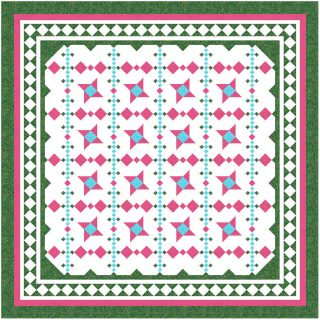
Remember the quilt I made for my friend going through treatment for breast cancer?

DeeDee’s Quilt

It’s been added to the EQ Files that are available to download.

EQ Files to Share

Sometimes when I make a quilt and am not interested in writing and testing a pattern for it, I can share the Electric Quilt file.

When I made Nicole’s New Beginnings Quilt, I had originally planned to offer it as a pattern but it ended up with some weird sizes and a lot of graphics that I just don’t have time to edit right now so I’m offering that as an EQ file.  If you use EQ7, you can download the file.

New Beginnings

New Beginnings

From time to time, I will add more files and will always post a note here when I’ve added a new one.

NB

I’m not sure if it’s a setting on my Firefox or what, but I can only download the files if I try it using Internet Explorer.  If anyone has any ideas about why this is happening, please let me know.  Otherwise, you’ll have to use IE to download the files.

I’ve added a link to the EQ Files in the top menu bar so it will be easy for you to find.  Here’s the link to the page.


Designing With EQ

All of my quilts are designed using Electric Quilt.  Every time I show a drawing, someone or a couple of “someones” will ask me to share how I go about the design process.  My way is probably not the best or the easiest way but it works for me.  As I design quilts over the next few months, I’ll share some tips that help me and maybe they will help you.

Rarely do I set out to design a quilt that will be made.  I mostly “doodle” in EQ and when something strikes me as a good possibility, I tweak it till I get it right.  Probably way over half of the drawings I make never actually get used but I enjoy doing it and sometimes it does lead to a great design.

Sunshine

The first thing I notice when I see this drawing is that the very dark part of the pieced border, which is the same green as in the body of the quilt, is too dark next to the ecru and pink.  From a distance, the green and pink appear purple and there is no purple in the quilt.  At some point, that has to be changed.

Another thing that strikes me as needing “fixed” is that if you look very closely, you will see some light green triangles spread throughout the body of the quilt.  Those either need to be taken out or they need to be a different color.  That’s too much work to have them blend into the background.

Sunshine

From looking at the drawing, I wasn’t sure if those light green triangles were the same color as something else in the quilt, but they were looking lighter because of the fabrics around them.  Using the “swap all color” tool, I changed them to red only so I could see where they were and if anything else changed to red.  Often, I will change sections of a block to something like black or white — something completely different from the other colors and that’s a very good way to determine if a secondary design can be made to appear.

Sunshine

My concern now is that the points going around the green edge of the center of the quilt are kinda wonky.  Some are bigger than others but it reminds me a bit of some of those scissors that cut fancy edges on paper.  This may or may not be the final version but with each revision, I get a little closer to what I want the quilt to look like.

This is another quilt that by the time I’ve come up with the final plan and finished the top and then quilted the whole thing, you’ll be tired of seeing it!

Borders for Blocks Set on Point

If, when using Electric Quilt, you’ve ever created a quilt with blocks set on point, you probably ended up with some weird numbers for those border length measurements.

On Point Setting

You can see that the center, with only the blocks and no borders added, the size of the top would be 67.882″ square.  As I add borders, I would round that up to 68″.  I would be adding .118 of one inch, which is less than 1/8th of an inch, to the nearly 68″ length and that is not enough to make a difference to cause borders to wave or to cause the quilt to not lay flat.

On Point Setting

The above picture shows that when I get to the second border, the size would be 74.382″.  Unless I do something to “fix” this project, once I add a smidgen to the first borders to get them to be an easier number to work with, I have to keep dealing with rounding numbers up or down to get the correct lengths for the side and top and bottom borders.  In the case of Nicole’s quilt, there are 8 borders so that would be 16 sets of numbers.  For me, those are opportunities for mistakes.

To make these border numbers in the project easier to work with, I “add a new quilt” by clicking on the “Quilt” button in the top bar.

On Point Setting

If I check “Keep Current Borders”, then all the borders I’ve already worked so hard to create will stay exactly the same in the new quilt.

On Point Setting

I make the “new” quilt with a horizontal setting.  I manipulate the size of the blocks or the number of blocks . . whatever combination works, to end up with the center section being the size I need for it to be.  I’m really paying no attention to the center of this quilt at all . . just trying to get it to the correct size so the borders are the sizes I need for them to be.  In this case, I need the center to be 68″ x 68″.

On Point Setting

The border lengths are now the size I need for them to be, without the need to add or subtract to get the perfect measurement for the lengths.

On Point Setting

This makes my job so much easier!